VectorNumber


[!TIP] You may be viewing documentation for an older (or newer) version of the gem. Look at Changelog to see all versions, including unreleased changes.
Do full linear algebra on Ruby objects. Yes, any objects.
# Create a vector where dimensions are whatever you want
v1 = VectorNumber[x: 3, y: 4]               # 3 in :x direction, 4 in :y
v2 = VectorNumber["weight" => 2.5, :x => 1] # mix symbols and strings
v3 = VectorNumber[:y => 2, [1, 2, 3] => 5]  # or any other objects

# Add them, scale them, find their lengths in a natural way
v1 + v2            # => (4⋅:x + 4⋅:y + 2.5⋅"weight")
v1 - v3            # => (3⋅:x + 2⋅:y - 5⋅[1, 2, 3])
v2 + "banana"      # => (2.5⋅"weight" + 1⋅:x + 1⋅"banana")
(v1 * 2).magnitude # => 10.0 (since 2*√(3²+4²) = 10)

# Calculate dot products, angles, and projections
v1.dot_product(v2)                # => 3 (= 3*1 + 4*0 + 0*2.5)
v1.angle(v2)                      # => 1.3460753063647353 (≈77.1°)
v1.vector_projection(v2).round(2) # => (1.03⋅"weight" + 0.41⋅:x)
VectorNumber treats every distinct Ruby object as a dimension in a vector space over the real numbers. This means you can do proper linear algebra on anything: symbols, strings, arrays, custom classes—whatever you need.
🚀 Why VectorNumber?
1. Full Linear Algebra on Any Domain
Need to work with weighted tags? Feature vectors for machine learning? Coordinate systems with non-numeric axes? VectorNumber gives you the math:
# ML feature vectors with meaningful dimension names
doc1 = VectorNumber["word_ruby" => 3, "word_gem" => 2, "word_library" => 1]
doc2 = VectorNumber["word_ruby" => 1, "word_gem" => 3, "word_code" => 2]

# Cosine similarity for document comparison
similarity = doc1.cosine(doc2).round(5) # => 0.64286

# Find which document is "closer" to a query
query = VectorNumber["word_ruby" => 1, "word_gem" => 1]
doc1.cosine(query) > doc2.cosine(query) # => true
2. Numeric-Like Behavior, Hash-Like Access
It feels like a number, but you can inspect it like a hash:
v = VectorNumber["apple", "orange"] # => (1⋅"apple" + 1⋅"orange")
v += "orange"  # => (1⋅"apple" + 2⋅"orange")
v["apple"]     # => 1 (coefficient lookup)
v["kiwi"]      # => 0 (missing dimensions are zero)
v.to_h         # => {"apple" => 1, "orange" => 2}
v.units        # => ["apple", "orange"]
v.coefficients # => [1, 2]
3. Plays Nicely with Ruby Numbers
Thanks to full #coerce support, VectorNumbers work seamlessly with Ruby's numeric types:
5 + VectorNumber["x"] * 2   # => (5 + 2⋅"x")
3.14 * VectorNumber[:theta] # => (3.14⋅:theta)
VectorNumber[8] < 10        # => true (compares real value)
4. Rich API
You want it? We got it!
| Category | Methods |
|---|---|
| Basic Ops | + and -, * and / (scaling), div and % |
| Rounding | round, ceil, floor, truncate (per-coefficient) |
| Norms | magnitude/abs, abs2, p_norm, maximum_norm |
| Projections | vector_projection, scalar_projection, vector_rejection, scalar_rejection |
| Geometry | dot_product, angle, subspace_basis, unit_vector |
| Hash-like | each, [], transform_coefficients, transform_units |
...and many, many more!
📜 Table of contents
Installation
Install with gem:
gem install vector_number
Or, if using Bundler, add gem to your Gemfile:
gem "vector_number"
[!NOTE] VectorNumber is officially supported (and tested) on MRI (CRuby), JRuby and TruffleRuby.
Usage
API Documentation
Full documentation with all methods and examples for each method is generated from source and is available online:
Quick Start
require "vector_number"

# Create vectors
VectorNumber[5, "hello", 5, :sym] # => (10 + 1⋅"hello" + 1⋅:sym)
VectorNumber["x" => 3, "y" => 4]  # => (3⋅"x" + 4⋅"y")
2 * VectorNumber[:a, :b, :c]      # => (2⋅:a + 2⋅:b + 2⋅:c)
# or more explicitly
VectorNumber.new([5, "hello", 5, :sym])
VectorNumber.new({"x" => 3, "y" => 4})

# Basic arithmetic
v = VectorNumber["apple" => 3] + VectorNumber["orange" => 2]
v -= "orange" # => (3⋅"apple" + 1⋅"orange")
v *= 1.5      # => (4.5⋅"apple" + 1.5⋅"orange")
Real-world Examples
📦 Inventory Management
The most basic function of VectorNumber is the ability to act similarly to a Hash but with defined arithmetic operations. This naturally leads to intuitive operations like addition and subtraction of inventory items.
class Inventory
  def initialize(items)
    @items = VectorNumber.new(items)
  end

  def add(item, quantity = 1)
    @items += VectorNumber.new({item => quantity})
  end

  def remove(item, quantity = 1)
    @items -= VectorNumber.new({item => quantity})
  end

  def has?(item, quantity = 1)
    @items[item] >= quantity
  end

  def total_value(prices)
    # Multiply each item's quantity by its price and sum them up
    @items.dot_product(VectorNumber.new(prices))
  end
end

inventory = Inventory.new("apple" => 10, "banana" => 5)
inventory.add("apple", 3)
inventory.remove("banana", 2)
inventory.total_value("apple" => 0.5, "banana" => 0.3) # => 7.4
📊 Weighted Scoring System
VectorNumber has several similarity measures out-of-the-box, and implementing custom ones can easily be done with map and reduce. This example shows how to calculate a match score between a candidate's skills and job requirements using cosine similarity.
class Candidate
  attr_reader :skills

  # @param skills [Hash{Symbol => Numeric}]
  #   keys are skills and values are proficiency levels
  def initialize(skills)
    @skills = VectorNumber.new(skills)
  end

  # Calculate similarity between candidate skills and job requirements
  # @param job_requirements [Hash{Symbol => Numeric}]
  # @return [Float] A score between 0 and 1
  def match_score(job_requirements)
    job_requirements = VectorNumber.new(job_requirements)
    @skills.cosine_similarity(job_requirements)
  end
end

job = {ruby: 5, rails: 4, sql: 3, nosql: 2}
alice = Candidate.new(ruby: 5, rails: 5, sql: 2, python: 3)
bob = Candidate.new(ruby: 3, rails: 2, sql: 4, java: 4)

alice.match_score(job).round(2) # => 0.87
bob.match_score(job).round(2)   # => 0.71
🔬 Scientific/Domain Modeling
VectorNumber can be used for scientific and domain modeling where vector operations are common.
# Work done by a constant force
displacement = VectorNumber[x: 3, y: -2.5]
force = VectorNumber[x: 5, y: 1]
work = force.dot_product(displacement) # => 12.5

# Gravitational force
position_massive = VectorNumber[x: 1.5, y: -200, z: -150]
position_small = VectorNumber[x: -120, y: 13, z: 15.5]
direction = position_small - position_massive
unit_direction = direction.unit_vector
gravitational_force = -unit_direction * 10_000 * 10 * 6.674 / direction.abs2
  # => (3.1317735497992065⋅:x - 5.490269679894905⋅:y - 4.265913765364352⋅:z)
Advanced Vector Operations
VectorNumber supports many vector operations beside vector arithmetic. This is a sample of what's available:
v = VectorNumber[x: 3, y: 4]
w = VectorNumber[x: 1, y: 2, z: 5]

# Vector properties
v.magnitude                     # => 5.0
v.p_norm(1)                     # => 7 (Manhattan distance)
v.unit_vector                   # => (0.6⋅:x + 0.8⋅:y)

# Relationships
v.dot_product(w)                # => 11 (=3*1 + 4*2 + 0*5)
v.angle(w)                      # => 1.1574640509137637 (rad)
v.vector_projection(w)          # => ((11/30)⋅:x + (11/15)⋅:y + (11/6)⋅:z)
v.scalar_projection(w)          # => 2.008316044185609
v.vector_rejection(w)           # => ((79/30)⋅:x + (49/15)⋅:y - (11/6)⋅:z)

# Basis operations
w.subspace_basis                # => [(1⋅:x), (1⋅:y), (1⋅:z)]
w.uniform_vector                # => (1⋅:x + 1⋅:y + 1⋅:z)

# Collinearity
v.collinear?(w)                 # => false
v.parallel?(v * 3)              # => true
v.opposite?(v * -1)             # => true
Hash-Like Operations
Most of Hash interface is implemented—though much of it comes from Enumerable—with the notable exception of self-modifying methods.
v = VectorNumber[a: 2, b: 3, c: 5]

# Querying
v[:a]                           # => 2
v[:d]                           # => 0
v.unit?(:b)                     # => true
v.unit?(:d)                     # => false
v.fetch(:d, 42)                 # => 42

# Transformation
v.transform_coefficients { |c| c * 2 } # (4⋅:a + 6⋅:b + 10⋅:c)
v.transform_units { |u| u.to_s }       # (2⋅"a" + 3⋅"b" + 5⋅"c")

# Enumeration
v.each { |unit, coeff| puts "#{coeff}×#{unit}" }
v.to_h                          # => {a: 2, b: 3, c: 5}
Custom String Conversion
While the default string representation works well for console output, there are many possible scenarios and use cases, so the to_s method supports customization:
v = VectorNumber[:a => 2, "x" => 5.5, [] => -3.14]
# Replacing the multiplication symbol
v.to_s(mult: :asterisk)
  # => "2*:a + 5.5*\"x\" - 3.14*[]"
# Custom formatting with a block
v.to_s { |unit, coeff, i| "#{' + ' unless i.zero?}(#{coeff}#{unit})" }
  # => "(2a) + (5.5x) + (-3.14[])"
# Using Enumerator for complex processing
v.to_enum(:to_s).map { |unit, coeff| "#{unit.inspect}: #{coeff}" }.join(', ')
  # => ":a: 2, \"x\": 5.5, []: -3.14"
Conceptual Basis
VectorNumber is built on the mathematical concept of a real vector space with countably infinite dimensions:
- Every distinct Ruby object (determined by
eql?) is a dimension - Each dimension has a coefficient (a real number)
- The real unit
1and imaginary unitiare special dimensions that subsume Ruby's numeric types - All operations follow vector space axioms
Furthermore, VectorNumbers exist in a normed Euclidean inner product space:
- All dimensions are orthogonal and independent
- The norm (magnitude) of a vector is calculated using the Euclidean norm
- Inner (dot) product is defined, which allows angles between vectors to be calculated
- All unit vectors have a length of 1
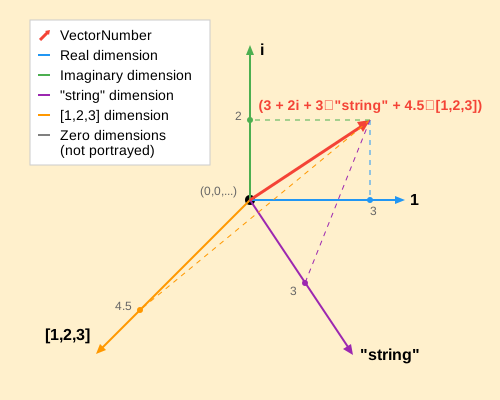
This might be more easily imagined as a geometric vector. For example, this is a graphic representation of a vector VectorNumber[3, 2i] + VectorNumber["string" => 3, [1,2,3] => 4.5]:
Development
After checking out the repo, run bundle install to install dependencies. Then, run rake spec to run the tests, rake rubocop to lint code and check style compliance, rake rbs to validate signatures or just rake to do everything above. There is also rake steep to check typing, and rake docs to generate YARD documentation.
You can also run bin/console for an interactive prompt that will allow you to experiment, or bin/benchmark to run a benchmark script and generate a StackProf flamegraph.
To install this gem onto your local machine, run rake install.
To release a new version, run rake version:{major|minor|patch}, and then run rake release, which will build the package and push the .gem file to rubygems.org. After that, push the release commit and tags to the repository with git push --follow-tags.
Contributing
Bug reports and pull requests are welcome on GitHub at https://github.com/trinistr/vector_number.
Checklist for a new or updated feature
- Running
rake specreports 100% coverage (unless it's impossible to achieve in one run). - Running
rake rubocopreports no offenses. - Running
rake steepreports no new warnings or errors. - Tests cover the behavior and its interactions. 100% coverage is not enough, as it does not guarantee that all code paths are tested.
- Documentation is up-to-date: generate it with
rake docsand read it. - "CHANGELOG.md" lists the change if it has impact on users.
- "README.md" is updated if the feature should be visible there.
License
This gem is available as open source under the terms of the MIT License, see LICENSE.txt.